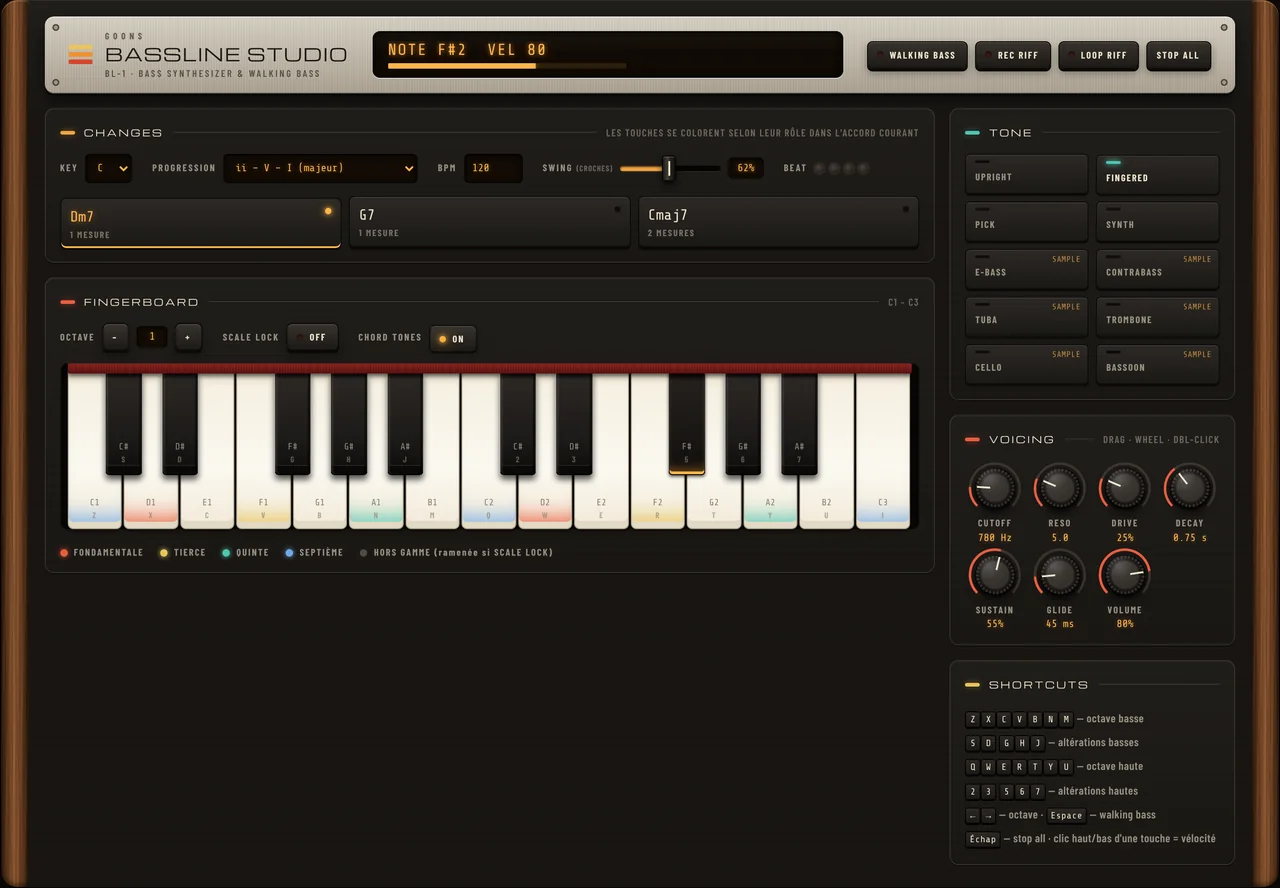
A bass instrument that knows which chord you are playing over. Pick a key and a progression and every key lights up by its role in the current chord: root, third, fifth or seventh. Turn on scale lock and a wrong note snaps into the scale. Press Space and it walks a bass line over the changes by itself.
Two detuned oscillators through a low-pass filter, tuned for the low register. Play it with the mouse or the A to K row of your keyboard. The full app adds the chord colours, the walking bass and eight tones.
Under the hood
A synth voice with a harmony brain in front of it
The sound engine is a classic bass voice: two oscillators, a sub, a resonant filter and drive, or a sampled instrument. What makes it different sits before the sound: the current chord decides how the keys are lit, where scale lock sends a wrong note and which notes the walking bass picks.
What you get
A bass you can learn harmony on
Most bass synths give you a sound. This one also shows you why a note works over a chord, and plays the line for you when you want to listen first.
Keys coloured by the chord
Each key takes the colour of its role in the chord that is playing: root, third, fifth, seventh, or out of the scale. When the progression moves to the next chord, the colours move with it, so you can see the chord tones before you have learned them by ear.
Scale lock
Switch it on and a note outside the current chord scale is pulled to the nearest note inside it. It only applies to what you play by hand, so you can improvise over the changes without a wrong note, and switch it off again when you want the tension back.
A walking bass that follows the changes
Press Space and Bassline Studio walks a line in quarter notes over the progression: chord tones on the strong beats, passing notes from the chord scale in between, and the odd swung skip note. Set the tempo from 40 to 300 BPM and the swing from straight to heavy.
Eight bass tones
Four synthesised voices, upright, fingered, pick and synth, each with its own attack click, sub and filter, plus four sampled instruments: electric bass, trombone, cello and bassoon. The same line sounds like a different band on each.
Filter, drive and glide
Cutoff and resonance shape the low end, drive adds grit, decay and sustain set how long a note rings, and glide slides between legato notes. Every tone starts from its own settings, and you can push any of them from there.
Record a riff, then loop it
Hit Rec riff, play a line, and Bassline Studio keeps the notes you actually heard, scale lock included. Loop it and play over it, or use it as the bass part of a sketch in the rest of the studio.
Ways to use it
Four progressions to start with
All four are in the progression menu. Start with walking bass on, listen for a few choruses, then take over.
Jazz
II-V-I
The three chords most jazz is built from. Watch the third of each chord on the keys: the line that connects them is the sound of the progression.
12 bars
BLUES
A jazz blues in twelve bars, all dominant sevenths with a ii-V at the end. The easiest way to hear when the walking line leans into the next chord.
Loop
TURNAROUND
I-VI-ii-V, four bars that never really end. Good for practising scale lock improvisation, because the chords change every bar.
One chord
MODAL
One minor seventh chord for four bars. With nothing changing, you hear exactly what each note of the scale does against it.
Getting started
From a key to your first walking line
Pick a key and a progression
Choose any of the twelve keys and one of the seven progressions. The keys light up straight away for the first chord.
Let it walk first
Press Space. Bassline Studio walks the changes at the tempo you set, and you can watch the colours move while you listen.
Play along with scale lock
Stop the walking bass, turn on scale lock and play your own line. Nothing you play can land outside the chord scale.
Record the riff you like
Rec riff, play, stop, then loop it. Change the tone afterwards to hear the same line on a cello or a synth bass.
Specifications
The full sheet
Type
Bass synthesizer with chord-aware keyboard and walking bass generator
Computer keyboard (two octaves), mouse or touch, MIDI controllers
Requirements
Any modern browser with Web Audio. No plugin, no download.
Why a bass synth that shows the chord
A bass line works because of where it sits against the chord: the root on the one, the third to define the colour, a passing note to lead into the next bar. Bassline Studio puts that on the keys in colour, so the theory is visible while you play rather than something you look up afterwards.
Listen, then take over
The walking bass is there to be copied. Let it play a chorus, watch which keys it picks on each chord, then stop it and play the next chorus yourself with scale lock on. When the lock stops correcting you, switch it off.
Part of a bigger studio
Bassline Studio runs alongside the drum machines, synths and the sample library of GOONS Studio, so a bass line you find here has a beat to sit on. A new account opens it free for 7 days, like every app in the catalog - no card required. After that, it is part of GOONS PRO.
Questions
Frequently asked
What is a walking bass?
A bass line in steady quarter notes that moves through the chords, mostly by step, landing on a chord tone on the strong beats. It is the standard bass part in jazz and swing. Bassline Studio generates one over the progression you choose, in any key.
What does scale lock do?
It moves any note you play outside the scale of the current chord to the nearest note inside it. It only changes what you play by hand: the walking bass and recorded riffs are left as they are.
Which progressions are included?
Seven: a major ii-V-I, a minor ii-V-i, the I-VI-ii-V turnaround, a 12-bar jazz blues, the A section of rhythm changes, a minor-key cycle of fifths and a one-chord modal vamp. Each one works in all twelve keys.
Can I use a MIDI keyboard?
Yes. Bassline Studio listens to MIDI controllers through the GOONS MIDI driver, and you can also play it from two octaves of the computer keyboard or with the mouse.
Does it sound like a real bass?
Four of the eight tones are sampled instruments: electric bass, trombone, cello and bassoon. The other four are synthesised voices modelled on an upright, a fingered and a picked bass, plus a synth bass.
Is Bassline Studio free?
For your first 7 days, yes. A new GOONS Studio account opens Bassline Studio, like every app in the catalog, with no card required. After that, Bassline Studio is part of GOONS PRO at €9.90/month - your account and your projects stay.
Bassline Studio is free for your first 7 days on GOONS Studio, like every app in the catalog - no card required. After that, GOONS PRO keeps it open for €9.90/month.